Load raw footage.
Get clean edit.
Croppa finds every silent pause in your footage and cuts it out automatically. Runs on your PC, nothing uploaded, simple and easy.
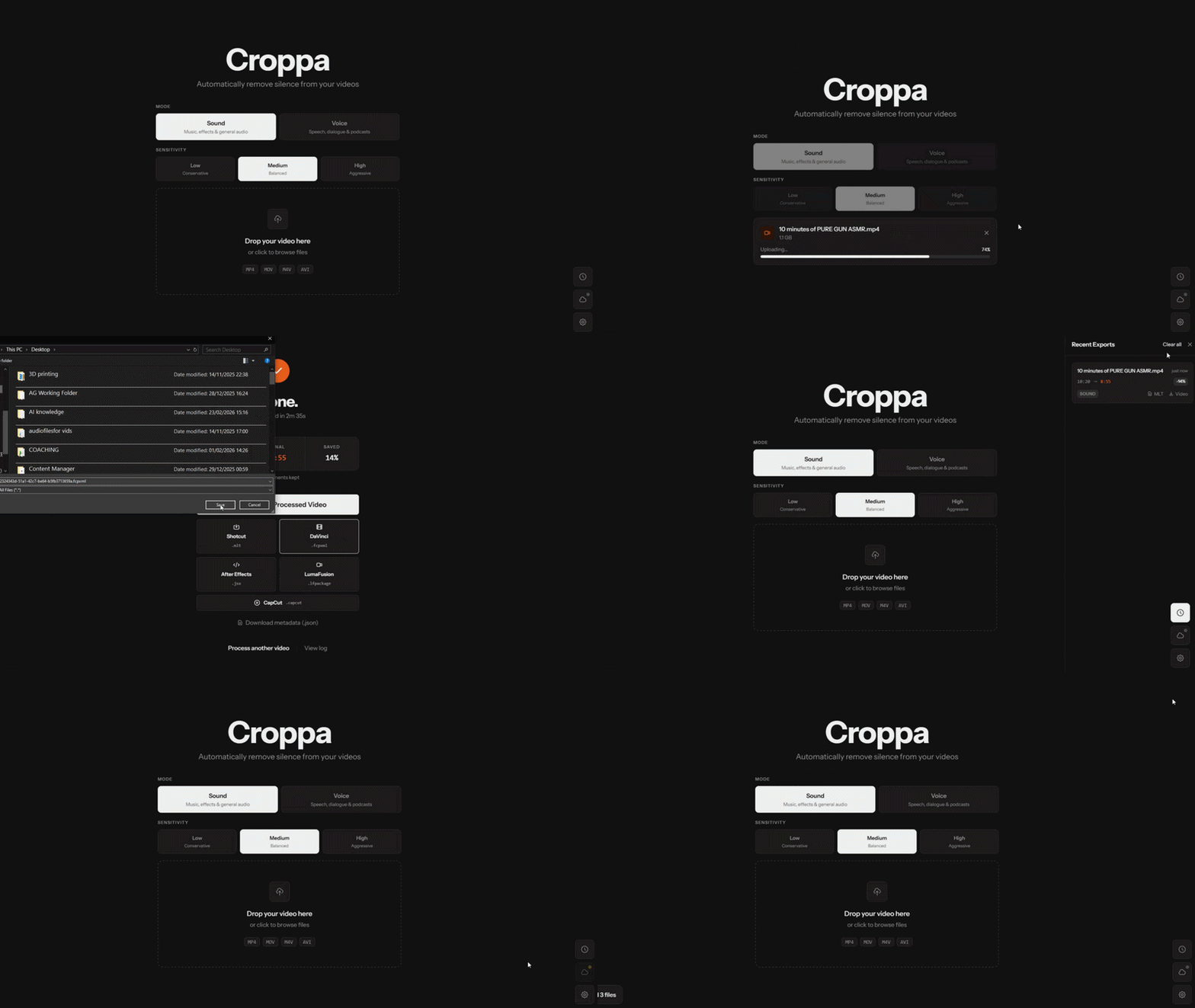
Cuts silence automatically
Scans your audio and removes every pause below an (automatically) set db threshold. Sensitivity can be adjusted manually too!
Load from phone
Directly load raw footage from mobile via a password-set cloudflare tunnel to Croppa running on your machine.
Fast encoding
GPU-accelerated with NVIDIA NVENC or falls back to CPU if needed. No settings to tweak - Croppa figures it out.
Stays on your machine
Your footage never leaves your PC. No cloud account, no uploads, no subscription. Just you and your files.
Opens in your editor
Exports a finished MP4, or a ready-to-open timeline for Final Cut Pro, Premiere Pro, DaVinci Resolve, LumaFusion or Shotcut.
 DaVinci Resolve
 Premiere Pro
 LumaFusion
 Shotcut
Dead simple to use
Install Croppa
Download and run the installer. Windows may show a SmartScreen prompt — click "More info" → "Run anyway". Normal for indie apps.
Drag in your footage
Drop your raw video file onto the app. Any length, any resolution. Nothing gets uploaded — it stays on your machine.
Set mode & sensitivity
Pick Sound or Voice mode. The threshold is set automatically, or tweak it manually with the slider.
Press Process
Croppa scans the audio, marks every silent gap, and re-encodes using your GPU (or CPU). Done in seconds.
Download your result
Export a finished MP4, or open the edit directly in Final Cut Pro, Premiere, DaVinci Resolve, LumaFusion, or Shotcut.
Croppa
- Unlimited video length
- GPU-accelerated encoding (NVIDIA NVENC)
- Export to MP4, FCP, Premiere, DaVinci, LumaFusion, Shotcut
- Adjustable silence threshold & padding
- 100% local - your footage stays on your PC
- Mobile remote tunnel
Secure checkout via Gumroad · Windows 10 & 11
Questions
Does it upload my footage anywhere?
Nope. Everything runs on your Windows PC. Your files never leave your machine. The only network request is a one-time licence check when you first activate.
Which editors can I export to?
Final Cut Pro (FCPXML), DaVinci Resolve (import the FCPXML), Adobe Premiere Pro (AEJSX script), LumaFusion, Shotcut (MLT XML) or just a finished MP4 if you don't need to do anything else.
Do I need an NVIDIA GPU?
No - it's a nice bonus but not required. Croppa detects your hardware and falls back to CPU encoding automatically.
Windows is warning me about the installer - is it safe?
Totally fine. Windows flags new apps it hasn't seen a million times yet. Click "More info" -> "Run anyway". Croppa only touches the internet once to verify your licence, never again after that.
Is this really a one-time payment?
Yes. Pay once, keep it forever - including all future updates. No monthly fees, no surprise charges. I built this because I needed it too.